
Skill Chamber Releases from versions v2026.05.03 → v2026.05.12

What’s New, In One Student’s Session
A visual walkthrough of the v2026.05.03 → v2026.05.12 window — the same fortnight of changes, viewed through the eyes of a student going through one practice session today. Every step below behaves differently from how it behaved two weeks ago.
(Skill Chamber is a B2B2C platform for small language schools — student-facing AI roleplay practice, teacher-owned curriculum. The student sessions below are real captures from a local end-to-end run on the “Answering Job Interview Questions” Scene-Starter, against the production v2026.05.12 build.)
Step 1 — Discovering a scene to practice
The student opens /scenarios or follows a magic link from their teacher. They click a scene card and the sessions dialog opens — past attempts at the bottom, and an expandable briefing summary at the top.
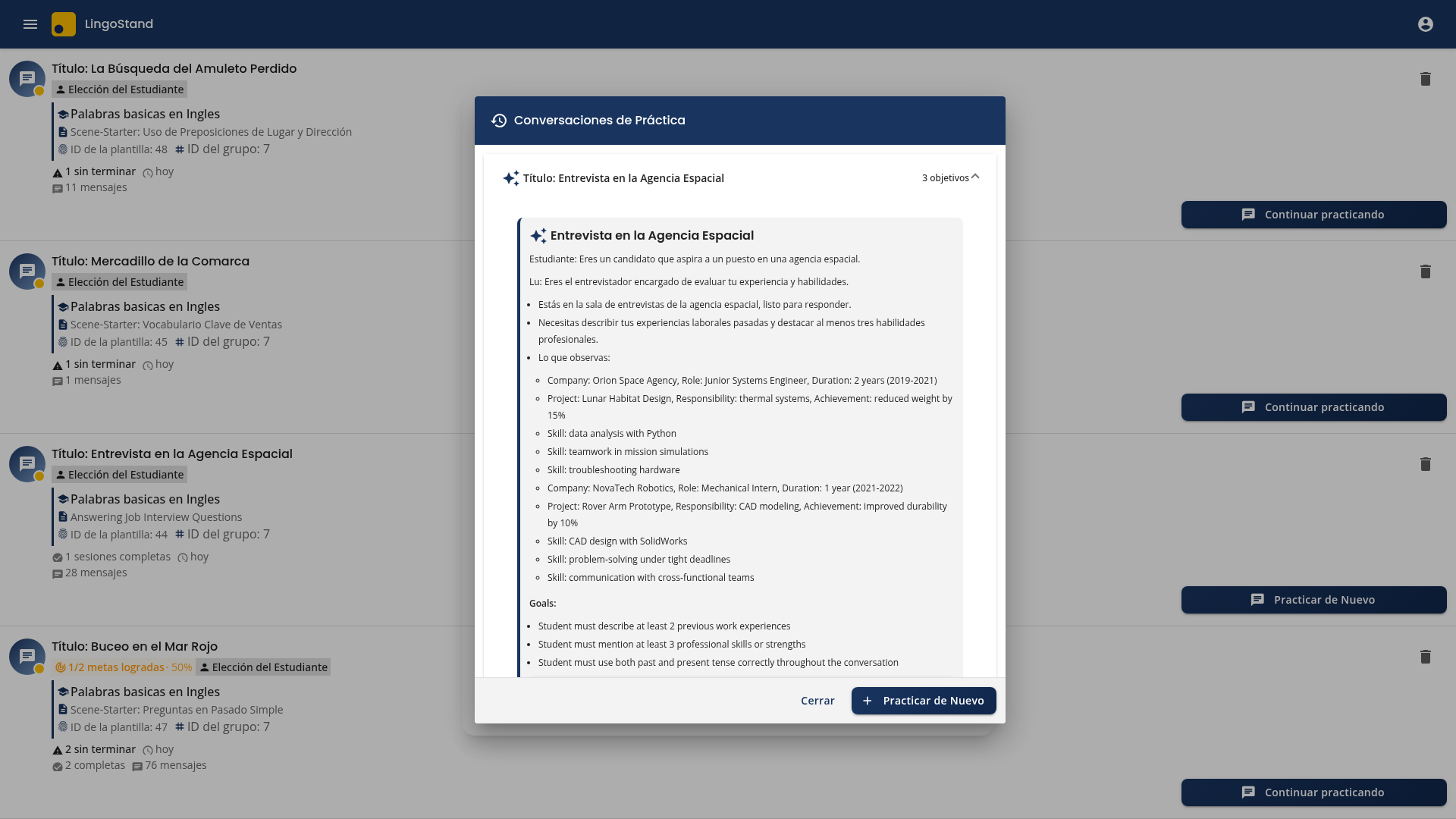
Three subtle improvements landed here in v2026.05.03 and the surrounding work:
Briefing is one click away. The full briefing (Roles, Context, Observable details, Goals) is wrapped in a collapsed
mat-expansion-panelby default — less scroll on first open, mobile-friendly. The student expands it when they want to recap what they’re walking into.Per-session action buttons stack full-width on small screens; the icon doesn’t crowd the description anymore.
The old “Detalles” button is gone. It used to live in the footer and exposed scenario-editing — a teacher concern leaking into the student flow. The footer is now just Cerrar and Practicar de Nuevo — the only two actions a student wants from a practice-history view.
Step 2 — Lu personalizes the scenario
The student enters the personalization chat. Lu adapts the scenario to their context — what their actual job is, what company they work at, what hobby they care about.
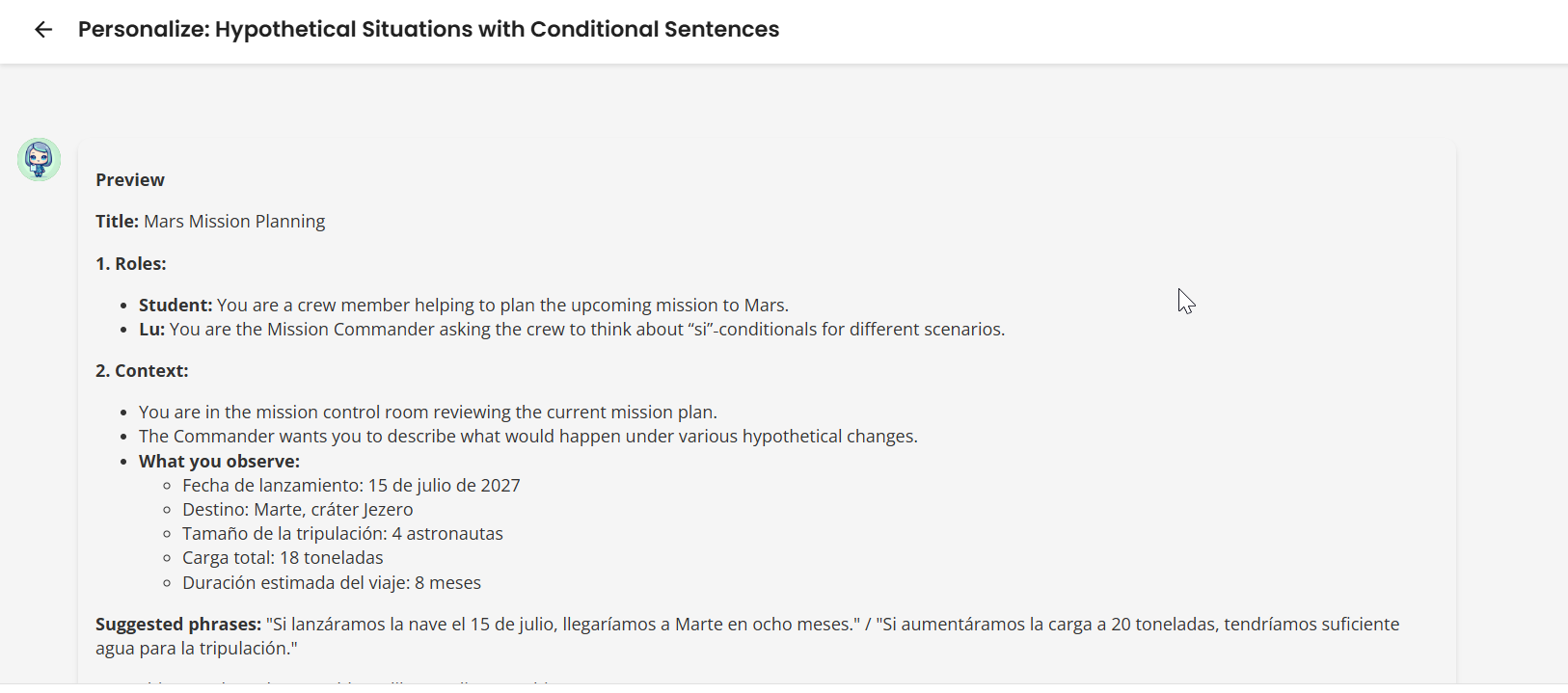
Three things changed about this surface that all show up in the screenshot above:
One sketch, one yes/no. Lu used to interview the student through four sequential questions (”What’s your job?” → “What company?” → “What’s the context?” → “What do you want to focus on?”). Now Lu proposes the entire scenario in one turn and asks “¿Te parece bien este escenario o te gustaría ajustar algo?” — one round-trip instead of four.
The AI persona is always “Lu.” Older flows occasionally introduced themselves as “Lucas” or other names; one consistent persona now across personalization, roleplay, and corrections.
The sketch ends with a “Frases sugeridas:” line — two complete target-language sentences, separated by a slash, with at least one of them quoting concrete data the student just provided (their role at Orion Space Agency, their responsibility on the Lunar Habitat Design project). Direction-aware: declarative sentences for scenarios where Lu asks the questions, questions for scenarios where the student asks Lu.
Behind the scenes the personalization agent migrated off the AG2 framework onto the direct SDK with explicit fallback chaining — same shape as the Final Evaluator and Blueprint agents. Each personalization round-trip saves about 3 seconds.
Step 3 — The handoff to /practice (often invisible now)
The student confirms. The route changes. For many students this stop is now invisible by design: if the teacher’s blueprint has a Template Scenario attached (the Deferred Personalization / Model-Z feature from v2026.04.28), the personalization step is skipped entirely — the student goes straight from clicking Practicar to landing at /practice/:id with no chat, no loading dialog, no transition state.
When fresh personalization does run, four old friction points have been polished out:
No more review screen. The redundant “¡Personalización Completa!” confirmation page is gone — the chat’s Preview → Confirm → Refine loop already captured the student’s “yes” seconds earlier. The student now flows straight from chat → loading dialog →
/practice/:id.Opaque backdrop on the loading dialog kills the bleed-through of the personalization chat behind. Visually the student is in transition, not in two places at once.
Auto-scroll suppressed until the student sends their first message, so the briefing card stays in view on arrival.
Rotating localized loading quotes during the transition (Spanish or English, depending on the student’s native language).
A wrapper-owned dialog persists across navigation — no more ~75ms flash of the briefing card between the inner dialog’s close animation and the practice route’s render.
No screenshot here is the right outcome: the best version of this stop is the one the student doesn’t notice.
Step 4 — Landing at /practice
The route opens to the practice page. Two weeks ago, this is where Lu’s voice would have fired immediately. Today it’s a deliberate, paced arrival.
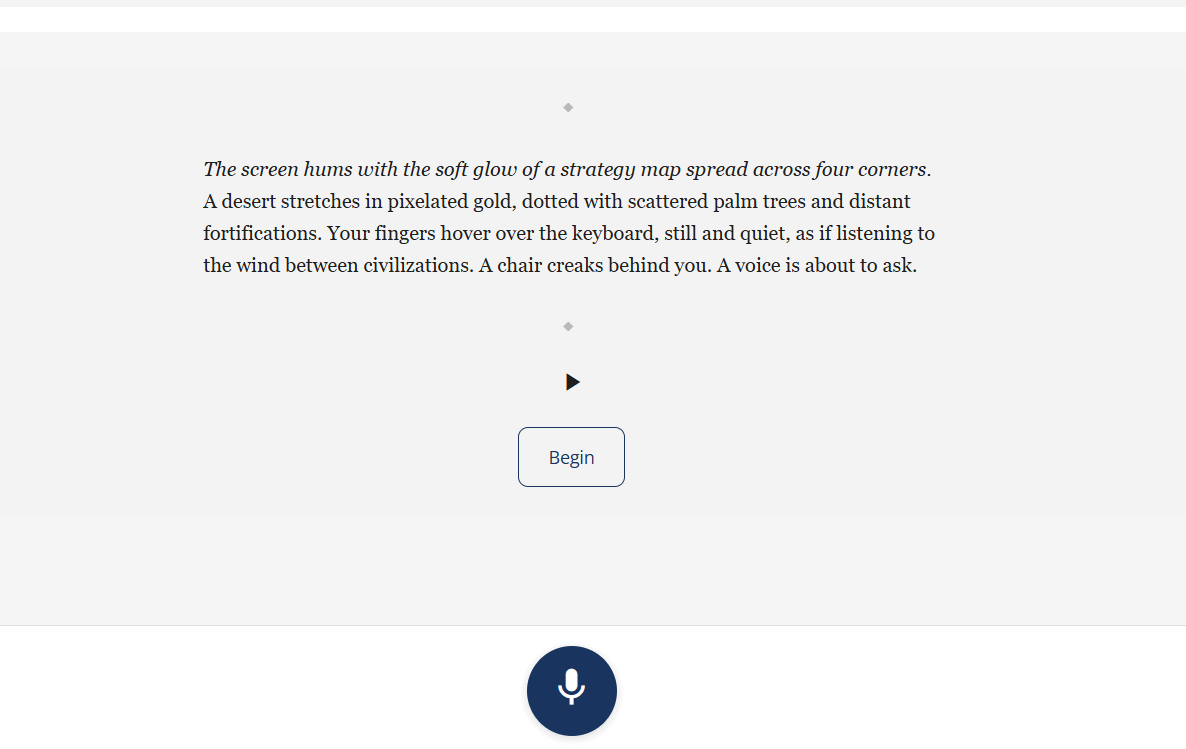
The briefing card renders first with the personalized roles, context, and goals.
Below it, the atmospheric scene-setter narrative reads in the student’s native language: “La luz de la mañana entra por la ventana, iluminando una mesa de acero pulida y una silla giratoria de cuero. En la pared, una bandera de la agencia espacial ondea ligeramente, y en el suelo, el eco de unos pasos recientes aún resuena. Frente a la mesa, una figura ajusta una carpeta de documentos. La puerta se abre. La figura levanta la vista.” Two to four sentences, no demand on the student’s L2 yet — they just arrive in the scene.
Play / Pause / Restart audio controls let the student listen instead of read.
A “Comenzar” button (not visible in the crop above but anchored to the input area) gates Lu’s first turn. Lu doesn’t speak until the student says they’re ready.
On a mid-conversation refresh, the gate silently bypasses itself — a small heuristic flips it when there’s already a message history, so the student isn’t re-prompted to “begin again” on a resumed session.
This single surface took four follow-up PRs across the fortnight to land as a finished feature. Two of the four fixes were invisible Angular gotchas: <lib-chat-message> was mounting during the scene-setter and silently triggering the TTS autoplay hook (so Lu’s English would play under the L1 narration); and the scene-setter spinner was stuck because the OnPush component read TTS state from plain Set<string> fields that don’t notify. Both got specific fixes (a hasBegunPractice gate, and converting the Sets to signals). The student sees this as “the page is quiet until I’m ready and the play button works.”
Step 5 — The conversation, and the goal hints that actually appear now
The student clicks Comenzar. Lu’s first turn arrives. They reply. The session flows.
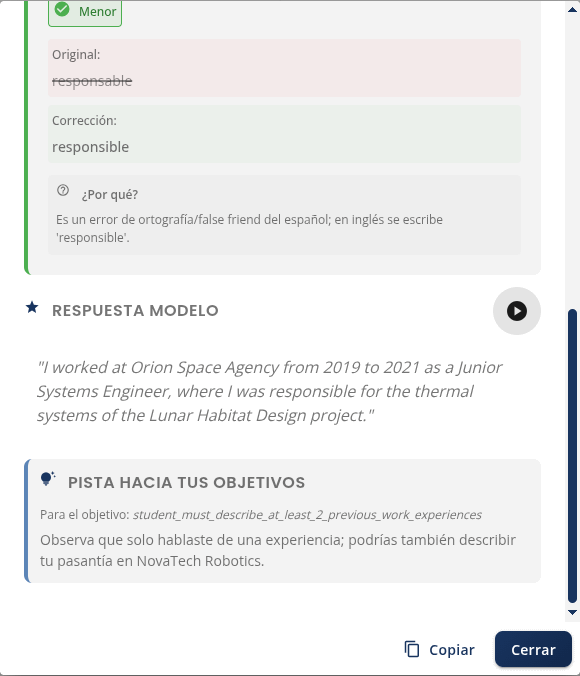
Two things are working here that broke silently in production two weeks ago:
The “Pista hacia tus objetivos” section renders reliably (visible at the bottom of the screenshot above). For the previous ~2 months, this hint section never rendered for any practicing student — Spring was shipping
blueprint_datato the Per-Message Evaluator as aMapon one code path and aStringon another, and the Map path was winning. The evaluator’s regex parser was returning an empty list every turn and goal hints were quietly dropped. Fixed at the contract layer; the hints now show with the actual goal slug the student is making progress toward (student_must_describe_at_least_2_previous_work_experiences) and a Spanish-language nudge derived from their own data (”Observa que solo hablaste de una experiencia; podrías también describir tu pasantía en NovaTech Robotics”).Per-message evaluator latency is stable. Production telemetry caught a 1-in-12 catastrophic tail (one call hitting 129s via a Gemini Preview disconnect). The primary model migrated to GPT-OSS 120B on Groq — different infrastructure path, the specific failure cannot recur. The field symptom (”sometimes the per-message feedback doesn’t load”) is gone.
Not in this screenshot, but worth a mention: session pacing in the chat header. The old “🚩 2/12” badge was a triple-misread — a flag icon that means “report this content” everywhere else, a numerator/denominator that read as a score, and a position that jumped because the badge only attached to the last AI message.
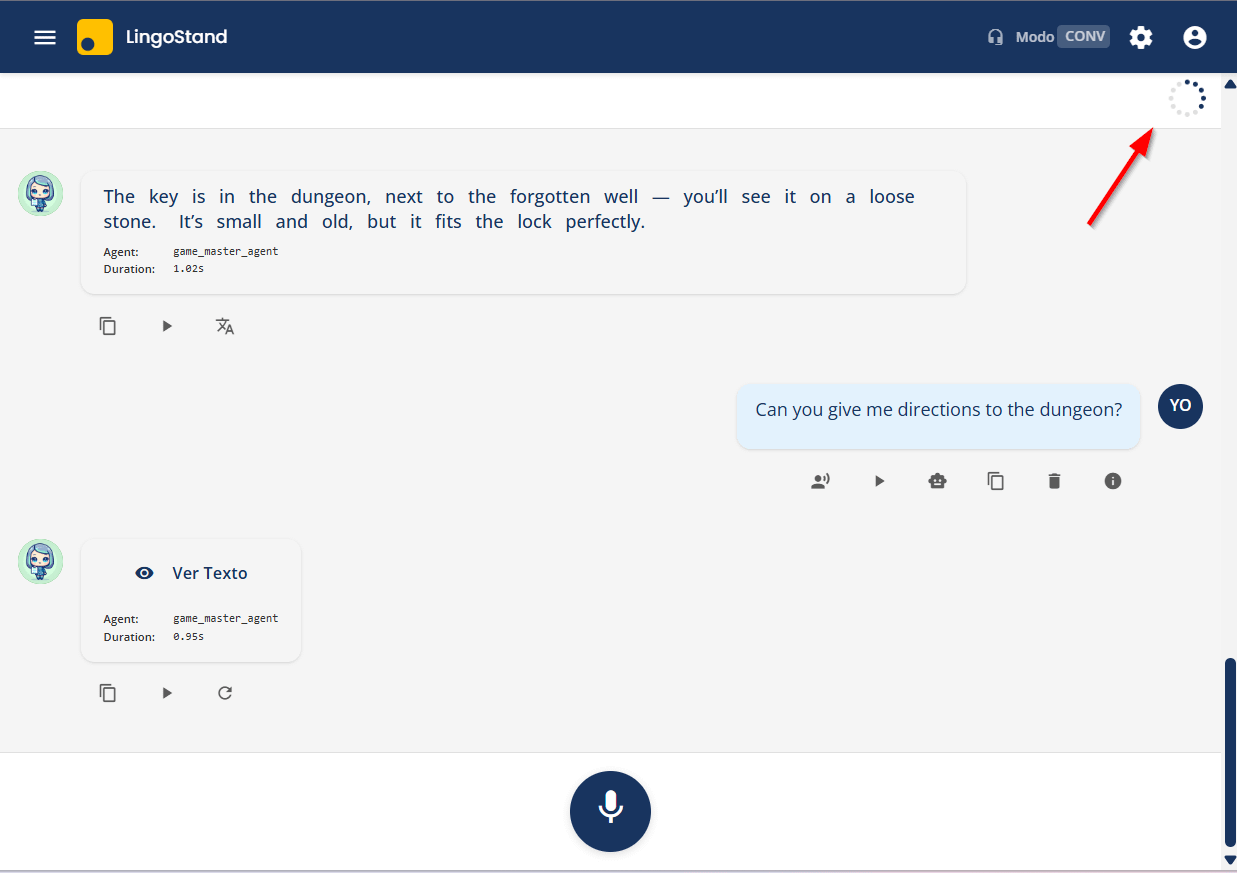
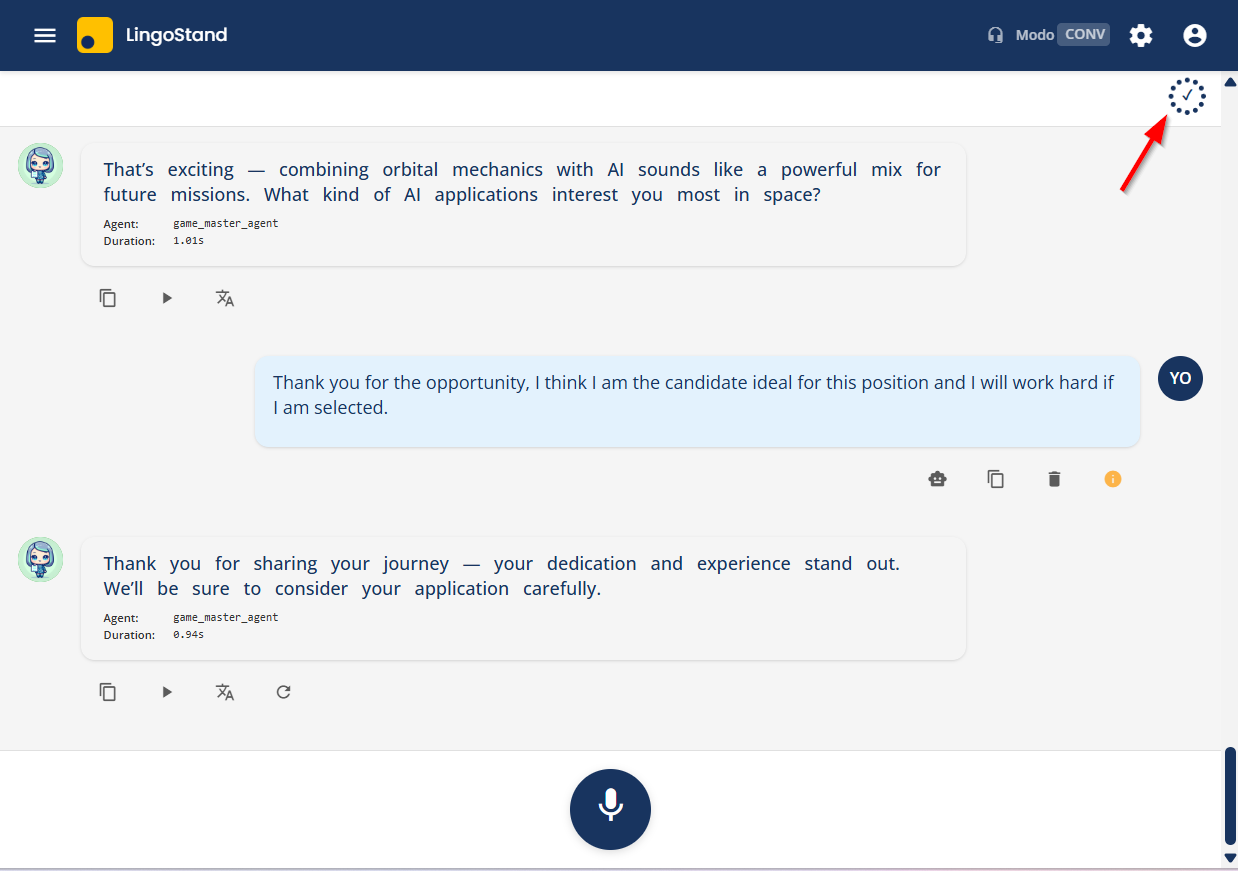
It’s now a 12-dot SVG ring in a sticky header strip, fills clockwise turn-by-turn, check mark at completion, respects reduced-motion preferences. The ring stays visible on resumed-but-active sessions, which an initial guard had silently broken (caught by a live Playwright run during the v2026.05.03 release).
Long conversations also render more smoothly: ChatMessageComponent is now OnPush with regex-heavy template bindings cached as fields. Students don’t notice the architectural change; they notice that turn 25+ on an older device doesn’t drop frames.
Step 6 — The session ends, the corrections arrive
The student finishes their twelve turns. Lu closes the conversation warmly:
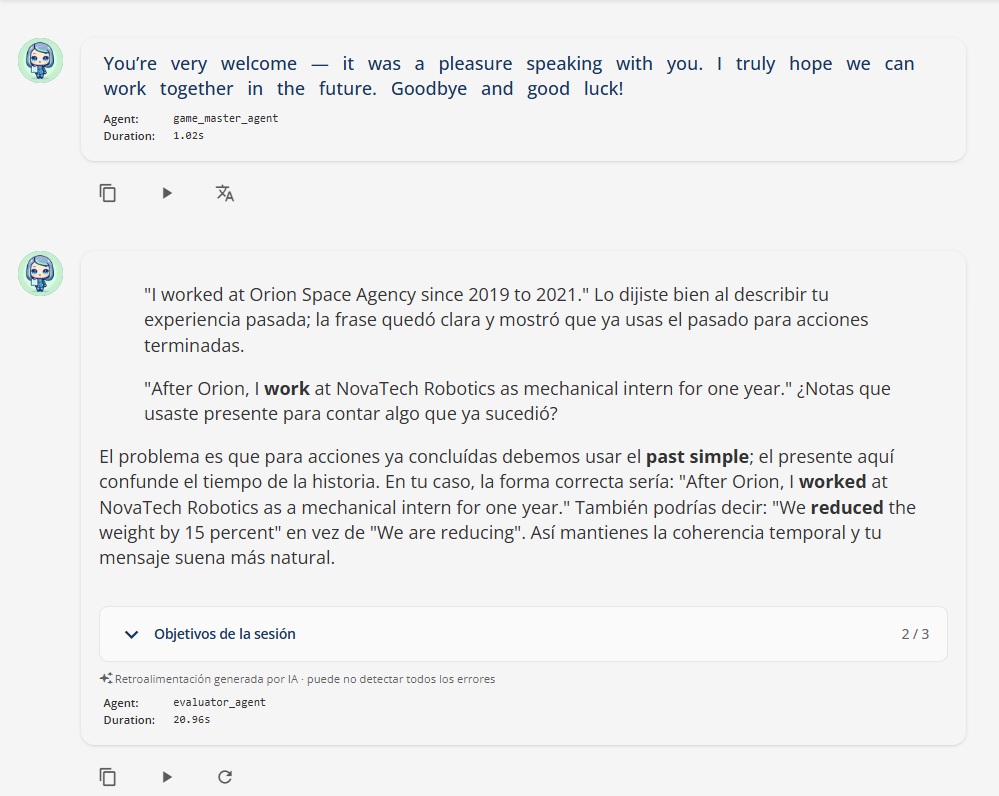
Then the corrections dialog opens. The more consequential shift here is not how the feedback looks but how it speaks. The Per-Message Evaluator now carries a teacher-voice layer derived from a 262-correction sample of the partner school’s lead teacher (Fernando Perez Cos, four years of forum corrections, UK adult learners). Six principles — selectivity over comprehensiveness, length proportional to the student’s input, no forced encouragement, short metalinguistic notes, in-context quoting of the student’s own phrase, and Spanish-side teaching with English-side framing — are now baked into the prompt that fires every roleplay turn.
Each of those principles converges on something the SLA literature has been arguing for thirty years:
Quoting the student’s own phrase before naming the error is Sharwood Smith’s textual enhancement (1991, 1993) and Schmidt’s Noticing Hypothesis (1990, 2010) — the learner first has to see the thing they wrote before they can re-map it. Generic rule explanations without a quoted referent skip the noticing step entirely.
Recasting the corrected form inline rather than lecturing is the conversational-recast pattern Long (1996) and Lyster & Ranta (1997) tracked in classroom interaction — and that Lyster & Saito’s 2010 meta-analysis credits as the most uptake-efficient feedback move for adult learners.
Refusing filler praise (”¡Perfecto!”, “Spot on!”, “Excellent grammar!”) sounds harsh on paper but is the anti-sycophancy stance Anthropic documented in Towards Understanding Sycophancy in Language Models (ICLR 2024) and the July 2025 arXiv:2507.21919 “warm-and-empathetic” finding — warmth without honesty teaches wrong Spanish. Fernando’s “no praise unless specific” rule is the empirical floor for that trade-off.
First-name warm openings, short metalinguistic notes, one focal point per correction are Krashen’s Affective Filter in practice — keep cognitive load low and emotional safety high so the student can absorb a single concrete fix instead of bracing against a wall of red.
The validation that triggered shipping the voice block was a real B1 student utterance: “La comida era deliciosa. Comimos tapas todos los días y mi padre estaba muy feliz porque le gusta el jamón.” The pre-block evaluator replied “Excellent use of the imperfect tense ... your grammar is spot on.” It is not spot-on — “Comimos tapas todos los días” is a habitual past requiring the imperfecto (comíamos), not the indefinido. The post-block evaluator caught it: “...habitual actions in the past require the imperfecto. Look at: ‘Comimos tapas todos los días’ — because this happened repeatedly, ‘comíamos’ is the correct choice.” That’s the single sentence that justified shipping the layer: warmth without honesty produces silent miscorrections; warmth with honesty produces uptake.
The screenshot above shows the corrections rendered in standard markdown today — quoted phrases, bold for emphasis, inline code for grammatical terms. The corrections dialog’s stylesheet does carry a Fernando-aligned palette (yellow blockquote = verbatim quote, red strong = error span, blue strong = rule name, muted code = term — see corrections-dialog.component.scss:199-237), but the visual signaling axis is partial: the CSS is wired, while the prompt teaches voice and pedagogy without yet prescribing the specific markdown shapes (blockquote + nested strong) that would light the palette up. So the language of Fernando’s method is in production; the typography of his method is the next pull. Honest description, not aspirational.
Two less-visible changes made the underlying score honest:
The final scorer no longer sees Lu’s own running estimates. A coupled bug had Lu’s per-turn
[[PROGRESS]]markers leaking into the Final Evaluator’s input — the scorer was leaning on Lu’s mid-session scoreboard instead of judging the raw transcript. After the fix, clean input scored 7 percentage points lower than the contaminated baseline. Same headline number; fundamentally honest meaning.The evaluator no longer hallucinates “student quotes” that were actually Lu’s words. A second coupled bug had per-message markers fused into
role=usercontent, diluting the role-tag distinction; v3 once quoted Lu’s opening turn (”what did you expect to find there?”) as the student’s strength. Dropping the marker fusion eliminated the misattribution.
What changed for the student, in one paragraph
A student who practices today goes through a session that is less startling, more grounded, better paced, and more honestly graded than the same student two weeks ago. They no longer encounter Lu’s voice firing as the page mounts; they no longer face a blank chat box; they no longer see a confusing “2/12” badge; they no longer wait for the goal-hint section that silently never rendered; and their final corrections now look like the same teacher pedagogy they’d recognize from the forum. The most consequential change is the least visible: the final score is no longer rubber-stamping Lu’s mid-session estimates — it’s a genuinely independent judgment of the transcript.
A parallel arc for teachers (no screenshots, just notes)
The student journey above is the front-stage change. There’s a parallel back-stage arc on the teacher side, worth noting briefly because it’s where partner-school adoption lives:
Lu’s corrections look like your corrections if you’re the partner teacher whose pedagogy was the model for the color system.
The dashboard frames AI numbers as guidance, not grades. Overview block and Goal-Progress section now carry subtle “AI-generated, may not detect all errors” cues.
One menu item, not two.
/teacherand/userscollapsed into a single role-aware User Management surface; old/teacherURLs redirect.Editing any user saves cleanly now, and the Create User dialog is role-aware (Admin / Teacher / Student) with correct validation per role.
Blueprint creation is faster and simpler. Section 4 (Template Scenario) authoring removed entirely; the primary AI model is now GPT-OSS 120B on Groq (about 1–2s instead of 3–5s per round). Read-path for existing blueprints preserved.
Winter Course migration is ready. All 18 Winter Course blueprints (IDs 11–28) reviewed and aligned with the 3-goal-per-blueprint rule; awaiting Fernando’s pedagogical sign-off before SQL generation.
Two production releases — v2026.05.03 and v2026.05.12. Twenty-four PRs. One student session that now flows. Screenshots captured from a real local end-to-end run on the “Answering Job Interview Questions” Scene-Starter against the production v2026.05.12 build.